

Problem
Car owners in Dubai often face fragmented experiences when dealing with vehicle care.
Customer pain points
- Scattered services — Repairs, oil changes, roadside help, registration, and car sales are usually handled through different channels (phone calls, WhatsApp, walk-ins, classifieds).
- Poor visibility — Customers struggle to see available services, pricing, and booking status in one place.
- Manual coordination — Workshops rely on phone calls and messages to confirm bookings, update customers, and answer questions.
- No digital vehicle record — Owners lack a simple way to store vehicle details and track service history in one app.
- Limited after-hours support — Getting quick answers or updates outside business hours is difficult without a proper digital channel.
Business challenges
Managing bookings, services, customer data, and communications without a unified system creates delays, missed updates, and extra admin work for the workshop team.
Solution
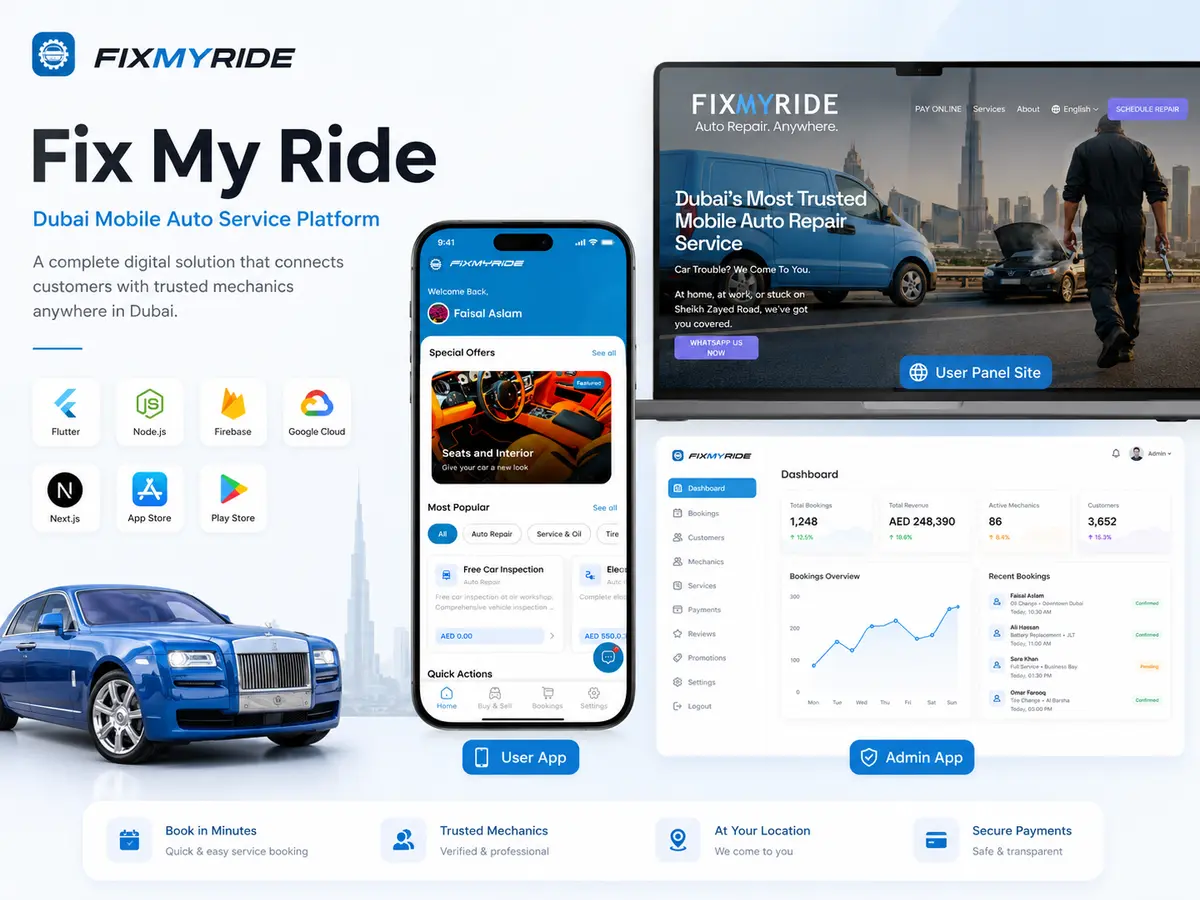
Fix My Ride solves this with an integrated mobile platform:
1. Customer Mobile App
Browse services, book appointments, manage vehicles, use the car marketplace, and chat with support — all from one Flutter app for iOS and Android.
2. Admin Mobile App
Handle bookings, update service status, manage the catalog, view analytics, send notifications, and reply to customers in real time — from a phone or tablet instead of a traditional web dashboard.
3. Node.js Backend
Powers authentication, bookings, services, vehicles, listings, chat, push notifications, and email alerts — connecting both apps through one shared API and Firebase project.
Customers get a smooth, modern mobile experience. The business gets faster booking handling, automated confirmations, and a central place to run daily operations.
My Role
Full-Stack Mobile & Backend Developer
I designed and built the entire platform end to end:
| Area | Responsibilities |
|---|---|
| Customer App | UI/UX, feature modules, booking flow, vehicle management, marketplace, chat, notifications, guest mode, and app resilience (server health checks, maintenance mode) |
| Admin App | Dashboard, booking management, service catalog, user overview, featured services, company settings, broadcast notifications, and admin chat |
| Backend API | REST APIs, Firebase integration, real-time chat (Socket.IO), email and push notification flows, security middleware, and health monitoring |
| System Integration | Firebase Auth (email, Google, Apple sign-in), Firestore, Storage, FCM, and deployment setup |
| Architecture | Owned architecture decisions, feature implementation, API design, and connecting all three parts into one working product |
Key Features
Customer App
| Feature | Description |
|---|---|
| Account & access | Sign up, sign in, password reset, Google/Apple login, guest browsing |
| Service discovery | Categories — auto repair, oil service, mobile mechanic, tires & batteries, dent & paint, roadside assist, RTA registration, annual service, accessories, and more |
| Service booking | Date/time selection, vehicle pick or manual entry, booking review, confirmation, and status tracking (pending → confirmed → in progress → completed / cancelled) |
| My vehicles | Add, edit, and manage vehicles with photos and registration details |
| Buy & sell marketplace | Browse, search, list cars for sale, and manage own listings |
| Real-time chat | Text, images, files, and voice messages with support; typing indicators and online status |
| Notifications | Push alerts and in-app notification history |
| Profile & settings | Edit profile, contact info, FAQs, terms, privacy policy, share app |
| Reliability | Server health check on launch, maintenance mode screen, auto-retry when server is down |
Admin App
| Feature | Description |
|---|---|
| Dashboard & analytics | Revenue overview, booking stats, user growth, vehicle counts, top services |
| Booking management | Accept/reject, start service, mark complete; automatic customer email and push on status change |
| Service management | Main categories and sub-services with pricing, descriptions, and icons |
| Featured services | Promotional carousel items with images |
| User management | View, search, and filter customers; see profiles, vehicles, and booking history |
| Notifications | Send push and email to all users or selected users; view history |
| Company settings | Business profile, contact details, working hours, social links, logo |
| Customer chat | Real-time inbox and one-to-one messaging with customers |
Backend
| Feature | Description |
|---|---|
| User management | Registration, login, profile, roles (customer/admin), account status |
| Business logic | Full CRUD for bookings, vehicles, services, car listings, and reviews |
| Real-time chat | Socket.IO for live messaging, presence, and delivery/read status |
| Notifications & email | FCM push and transactional emails (booking confirmations, status updates) |
| Health & maintenance | API health monitoring and maintenance mode for the apps |
| Security | Authentication, rate limiting, secure headers, file upload validation |
Technologies & Capabilities
| Layer | Technologies |
|---|---|
| Customer & Admin Apps | Flutter, Dart, GetX |
| Backend | Node.js, Express |
| Database & Storage | Firebase Firestore, Firebase Storage |
| Authentication | Firebase Auth (Email, Google, Apple) |
| Real-Time Chat | Socket.IO |
| Push Notifications | Firebase Cloud Messaging (FCM) |
| Nodemailer (Gmail SMTP) | |
| Monitoring | Firebase Crashlytics, Firebase App Check |
| Deployment | Render (backend), Google Play & App Store (mobile) |
Architecture / Workflow
System Architecture
Booking Lifecycle (Sequence)
Real-Time Chat Flow
Booking Status Workflow
| Status | Triggered By | Customer Sees | Notifications |
|---|---|---|---|
| Pending | Customer submits booking | "Awaiting confirmation" | Email to customer + push to admin |
| Confirmed | Admin accepts | "Booking confirmed" | Push + email to customer |
| In Progress | Admin starts service | "Service in progress" | Push + email to customer |
| Completed | Admin marks done | "Service completed" | Push + email to customer |
| Cancelled | Admin or system rejects | "Booking cancelled" | Push + email to customer |
Data Model (Core Areas)
| Area | Purpose |
|---|---|
| Users | Customer accounts with profile, vehicles, and roles |
| Admins | Business team accounts with admin-only access |
| Bookings | Service appointments with status, vehicle, date/time, and service type |
| Services | Main categories and sub-services with AED pricing and descriptions |
| Vehicles | Customer vehicle records with photos and registration details |
| Car Listings | Buy/sell marketplace entries with search and filters |
| Featured Services | Promotional carousel items for the home screen |
| Chat Messages | Real-time conversations with text, media, and voice |
| Notifications | Push history and in-app notification records |
| Company Settings | Business profile, hours, contact info, and social links |
| Reviews | Customer feedback on completed services |
Typical Customer Journey
- User opens the app — splash checks server health and login state.
- User browses services or continues as guest.
- User selects a service → fills booking form → reviews and confirms.
- Backend creates booking → sends email to customer and admin → push alert to admin.
- Admin accepts and updates status in the admin app.
- Customer gets push/email updates and can track status in My Bookings.
- Customer can chat with support anytime via the in-app chat button.
Typical Admin Workflow
- Admin logs in (admin role required).
- Dashboard shows today's stats and quick actions.
- New booking appears → admin accepts or rejects.
- Service progresses: confirmed → in progress → completed.
- Each status change triggers customer notification and email.
- Admin manages services, featured offers, and company info as needed.
- Admin responds to customer chats from the Chats tab.
Data Flow Summary
- Most business data (bookings, services, users) flows through the REST API.
- Firebase Auth handles secure login and API tokens.
- Socket.IO handles live chat and presence.
- Firestore stores notifications and supports real-time admin views.
- Firebase Storage stores images (vehicles, listings, profile photos, chat files).
Production Deployment Layout
| Service | Technology | Delivery |
|---|---|---|
| Customer App | Flutter, GetX | Google Play & App Store |
| Admin App | Flutter, GetX | Internal business distribution |
| Backend API | Node.js + Express on Render | REST API with health monitoring |
| Real-Time Chat | Socket.IO on same backend | Live messaging and presence |
| Auth & Storage | Firebase Auth, Firestore, Storage | Identity, notifications, file uploads |
| Push & Email | FCM + Nodemailer | Booking alerts and status updates |
Challenges
1. Building three apps as one product
Challenge: Keeping customer app, admin app, and backend aligned on data models, booking statuses, and chat behavior.
Solution: Careful planning and consistent API design with shared data models across all three surfaces.
2. Real-time chat at production quality
Challenge: Delivering reliable messaging with text, media, voice, typing indicators, online status, and push when users are offline.
Solution: Combined REST, Socket.IO, and FCM into one cohesive chat system.
3. Smooth booking lifecycle
Challenge: Coordinating booking creation, admin actions, status updates, email templates, and push notifications so customers always get timely, accurate updates.
Solution: Automated notification pipeline triggered on every status change with templated emails and push alerts.
4. Guest vs. signed-in experience
Challenge: Allowing browsing without an account while clearly guiding guests to sign in for booking, chat, and personal features.
Solution: Guest mode for service discovery with contextual sign-in prompts when authenticated features are needed.
5. App reliability
Challenge: Handling server downtime and maintenance mode gracefully so users see clear screens instead of broken flows.
Solution: Server health check on launch, maintenance mode screen, and auto-retry when the server is down.
6. Firebase + custom backend
Challenge: Using Firebase for auth and storage while routing most business logic through a custom Node.js API, including Google and Apple sign-in.
Solution: Firebase Auth for identity with custom API tokens; Firestore for notifications and real-time views; Node.js for all business logic.
7. Admin on mobile
Challenge: Designing a full business management tool on a phone/tablet instead of a traditional web dashboard, while keeping workflows fast for daily use.
Solution: Mobile-first admin app with dashboard quick actions, streamlined booking flows, and real-time chat inbox.
8. UAE-specific services
Challenge: Supporting local needs such as RTA registration, AED pricing, Dubai location, and service categories that match a real workshop offering.
Solution: Tailored service catalog and booking flows built around the business's actual workshop services and UAE market requirements.
Final Result
Live Production Platform
Delivered Outcomes
- Complete, production-ready automotive services platform with customer app (v1.0.0+) for iOS and Android.
- Admin mobile app for business operations on the go — no separate web dashboard required.
- Scalable Node.js backend deployed on Render with health monitoring.
- Real-time customer support chat with media and voice messaging.
- Automated booking notifications via push and email on every status change.
- Digital vehicle garage and car buy/sell marketplace in one app.
- Analytics dashboard for business insights in the admin app.
- Secure authentication with email, Google, and Apple sign-in.
The platform digitizes Fix My Ride's Dubai workshop services into a modern mobile experience — making it easier for customers to book and track services, and for the business team to manage operations, communicate, and grow from one connected system.
Business contact: Al Quoz Industrial Area 4, Dubai | fixmyride.ae | +971 50 800 6195