

Problem
Most messaging apps depend on internet access and centralized servers. That works well in cities and connected environments, but it fails in many real-world situations.
Connectivity gaps
- No connectivity — Rural areas, remote events, travel, or disaster zones where mobile data and Wi-Fi are unavailable.
- Centralized dependency — Popular apps like WhatsApp and Telegram cannot function without servers and an active internet connection.
Poor offline alternatives
- Basic Bluetooth or Wi-Fi Direct file sharing tools lack a proper chat experience.
- They do not support mesh-style message forwarding and struggle with large media files.
- Connecting nearby devices often requires technical steps that everyday users find frustrating.
There was a clear need for a simple, reliable way for people to communicate and share media locally — without internet, without accounts, and without sacrificing a modern chat experience.
Solution
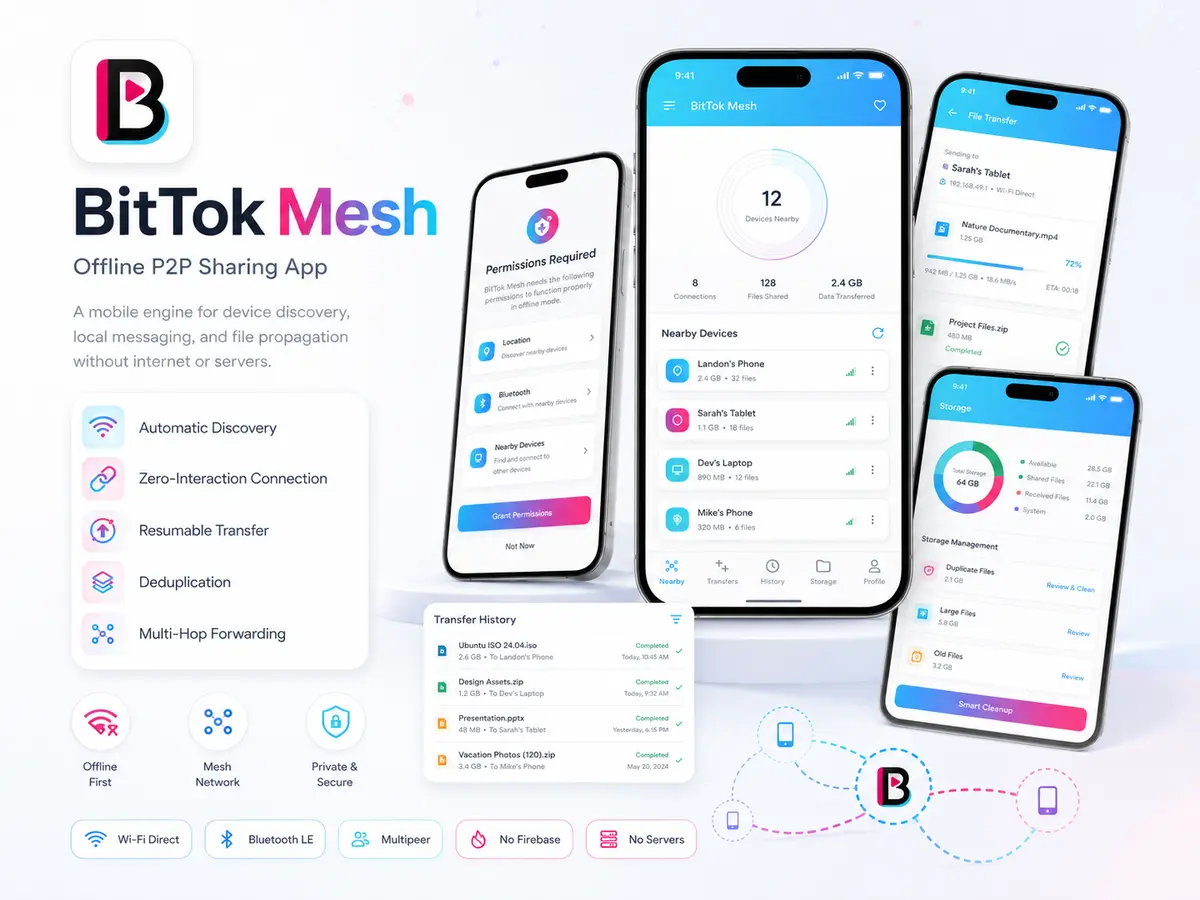
BitTok Mesh solves this by turning nearby phones into a local communication network.
The app automatically finds other BitTok devices in range and connects to them with minimal user action. Once connected, users chat and share media in a familiar messaging interface. Messages and files pass directly between devices using local wireless connections — not through the internet.
When a message cannot reach someone directly, it can be forwarded through other phones in the network, extending reach beyond a single device's range. Large files such as videos are sent in smaller pieces and can resume if the connection drops, so transfers are more reliable on unstable local links.
The experience is designed to feel simple for users while the app handles the complexity behind the scenes: device discovery, connection management, message delivery, media compression, storage limits, and privacy-friendly anonymous device names.
My Role
Full-Stack Mobile Developer (Freelance)
I was the sole developer responsible for designing BitTok Mesh from initial concept through release-ready builds. My work covered the entire product:
| Area | Responsibilities |
|---|---|
| Product development | Planned and delivered the app in structured milestones — from core discovery and connection to chat, media sharing, mesh forwarding, and release polish |
| Flutter application | Built the UI/UX, BitChat experience, settings, permissions flow, and app architecture |
| Native Android | Implemented Wi-Fi Direct and Bluetooth discovery, background services, file transfer engine, encryption, and storage management in Kotlin |
| Native iOS | Built peer discovery and file transfer using Apple's Multipeer Connectivity framework in Swift |
| Bridge layer | Connected Flutter with native code so discovery, transfers, and messaging work smoothly across both platforms |
| Stability & release | Fixed connection issues across different devices, optimized performance for lower-end phones, and prepared signed release builds for Android and iOS |
Key Features
For Users
| Feature | Description |
|---|---|
| Offline chat (BitChat) | Send and receive text, photos, videos, and voice notes without internet |
| Automatic device discovery | Nearby BitTok devices are found and connected with little or no manual setup |
| Mesh message forwarding | Messages travel across multiple phones, extending reach beyond direct range |
| Familiar chat interface | Clean, WhatsApp-inspired design that feels natural to use |
| Rich media sharing | Capture from camera, pick from gallery, record voice notes, and play videos inline |
| Smart video handling | Large videos are compressed before sending to improve transfer success |
| Connection status | Clear indicators showing when devices are connected or searching |
| Storage controls | Manage device storage, set limits, and clean up old content |
| Privacy-friendly | No accounts required; devices use anonymous names instead of personal profiles |
| Guided onboarding | Step-by-step permission setup so the app works correctly on first launch |
Under the Hood — Android Native
| Capability | Description |
|---|---|
| Wi-Fi Direct discovery | Automatic peer detection and connection management |
| Bluetooth LE fallback | Secondary discovery path for compatible devices |
| Foreground service | Keeps discovery active when app is minimized |
| Chunked file engine | Large file transfers with resume and SHA-256 verification |
| AES encryption | Optional encryption layer on shared content |
| Storage manager | Cache limits, cleanup, and duplicate file detection |
Under the Hood — iOS Native
| Capability | Description |
|---|---|
| Multipeer Connectivity | Apple's framework for local peer discovery and sessions |
| Session management | Auto-reconnect and peer state synchronization |
| File transfer bridge | Chunked delivery with integrity checks |
| Background handling | Lifecycle-aware discovery within iOS constraints |
Technologies & Capabilities
| Area | Technologies |
|---|---|
| Mobile app | Flutter, Dart |
| State & navigation | GetX |
| Local data | SQLite, Shared Preferences |
| Media | Camera, image picker, video player, video compression, voice recording |
| Android native | Kotlin, Wi-Fi Direct, Bluetooth LE, foreground services |
| iOS native | Swift, Multipeer Connectivity |
| Security | AES encryption, SHA-256 file verification |
| Design | Custom UI with Poppins typography, responsive layout |
Architecture / Workflow
System Architecture
The app uses a layered design: a Flutter interface on top, a service layer in Dart for messaging and media, and custom native engines on Android and iOS that handle device discovery and file transfer. Flutter and native code communicate through platform channels so users get one seamless experience.
Message Send & Receive Flow
Mesh Forwarding Flow
Messages carry unique IDs and hop counters. Each device tracks what it has already received to prevent loops and duplicate forwards.
File Transfer Flow (Large Media)
Typical User Journey
- Launch — User opens BitTok and sees the splash screen with "The Offline Web" branding.
- Permissions — App guides the user through location, Bluetooth, Wi-Fi, camera, microphone, and notification permissions.
- Chat — User lands on the main BitChat screen; discovery starts automatically in the background.
- Connect — When another BitTok device is nearby, the app connects without manual pairing.
- Send — User sends a message or media; it is saved locally and shared with connected devices.
- Forward — Other devices in the network pass the message along, helping it reach phones farther away.
- Receive — Incoming messages appear in the chat timeline; media can be viewed or played directly in the app.
- Manage — User adjusts storage settings, views nearby devices, or clears chat history from Settings.
Local Data Model
| Area | Purpose |
|---|---|
| Messages | Text, media references, timestamps, sender device ID |
| Devices | Discovered peers, connection status, anonymous device names |
| Media Files | Cached photos, videos, voice notes with storage paths |
| Transfer State | Chunk progress, resume offsets, and verification hashes |
| Mesh Registry | Message IDs seen, hop counts, and forward eligibility |
| Settings | Storage limits, permissions state, and user preferences |
| Chat History | Threaded timeline with delivery status indicators |
Challenges
1. Unreliable local connections
Challenge: Wi-Fi Direct connections can drop or show different states on different phones.
Solution: Careful connection handling, state syncing, and retry logic.
2. Discovery in the background
Challenge: Keeping device discovery active when the app is minimized on Android.
Solution: Foreground service and lifecycle management so users do not lose connectivity when switching apps.
3. Android permission complexity
Challenge: Modern Android versions require multiple permissions (location, nearby devices, Bluetooth) for local networking.
Solution: Clear onboarding flow so users understand why each permission is required.
4. Device compatibility
Challenge: Different phone brands and models behave differently with Wi-Fi Direct and Bluetooth.
Solution: Device-specific adjustments, longer connection timeouts, and fallbacks for budget and older devices.
5. Large media on weak links
Challenge: Sending videos over local wireless connections is slow and fragile.
Solution: Video compression, chunked transfers, and resume support for a reliable experience.
6. Mesh forwarding without duplicates
Challenge: Ensuring messages reach more devices without creating loops or sending the same content repeatedly.
Solution: Careful message tracking and hop limits.
7. Cross-platform parity
Challenge: Android and iOS use different native networking technologies.
Solution: Custom native implementations on both platforms rather than a one-size-fits-all plugin.
8. Race conditions with media
Challenge: Files sometimes arrived before their message metadata.
Solution: Logic to hold and match incoming files correctly so the chat timeline stays consistent.
Final Result
Live Production Platform
Production Readiness
| Area | Status |
|---|---|
| Version | 1.1.0 — release-ready builds for Android and iOS |
| Platforms | Cross-platform Flutter with custom native engines on both OSes |
| Offline capability | Full chat and media sharing with zero internet dependency |
| Security | AES encryption, SHA-256 file verification, anonymous device names |
| Storage | Configurable limits with cleanup tools |
Delivered Outcomes
- Fully functional cross-platform offline messaging app (version 1.1.0), ready for release on Android and iOS.
- Working offline chat with automatic device discovery and connection.
- Mesh-style message forwarding so communication extends beyond direct phone-to-phone range.
- Reliable media sharing with compression, resumable transfers, and inline playback.
- Polished, user-friendly interface that feels familiar rather than experimental.
- Custom native networking engines on both Android and iOS — not a simple wrapper around existing plugins.
- Production-oriented features including storage management, encryption support, and release build configuration.
Impact for Users
People can open BitTok Mesh, find nearby devices, and start chatting — even with no internet. Messages and media move through a local network of phones, giving communities, events, remote areas, and offline environments a practical way to stay connected.
In one line: BitTok Mesh turns nearby phones into a local communication network — The Offline Web — so people can chat and share media anytime, anywhere, without relying on the internet.